The Housekeeping Room Assignments command allows you open the Housekeeping Room Assignments screen, where you can assign the rooms within your property to specific housekeepers for cleaning, and print out these assignments as a report to give to your Housekeepers.
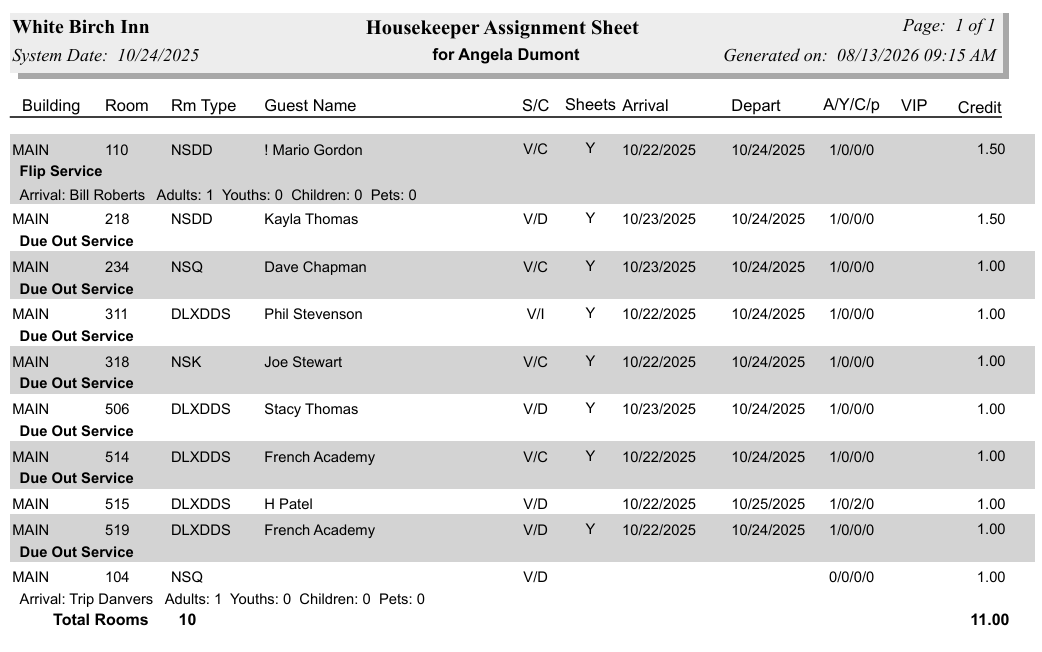
The report will show the building the room is in, with what kind of service is required for the room (flip service, stayover, check out etc) and any arriving guest name (and numbers of adults, youths, children, and pets) below it, then the room number and the room type, the current guest (occupying the room) name, the status (O=Occupied, V=Vacant, X=OOO) and condition (D=Dirty, C=Clean, I=Inspected, P=Picked-Up) of the room, if the sheets need changing (Y or N), the arrival and departure dates of the guest(s), the number of adults, youths, children, and pets in the room, if the guest has any VIP status associated with them and the number of housekeeping credits awarded for the room. The total number of rooms and housekeeping credits is also shown on the report.
A hatch sign, a percentage sign or an exclamation point preceding the guest name on the printed Housekeeping assignment sheet indicate respectively that this guest has an early check in, a late check out, or a special request or preference recorded in the system. The details may be viewed on the Arrivals Report.
You may also print out a Master List of all the assigned rooms, and to whom they were assigned.
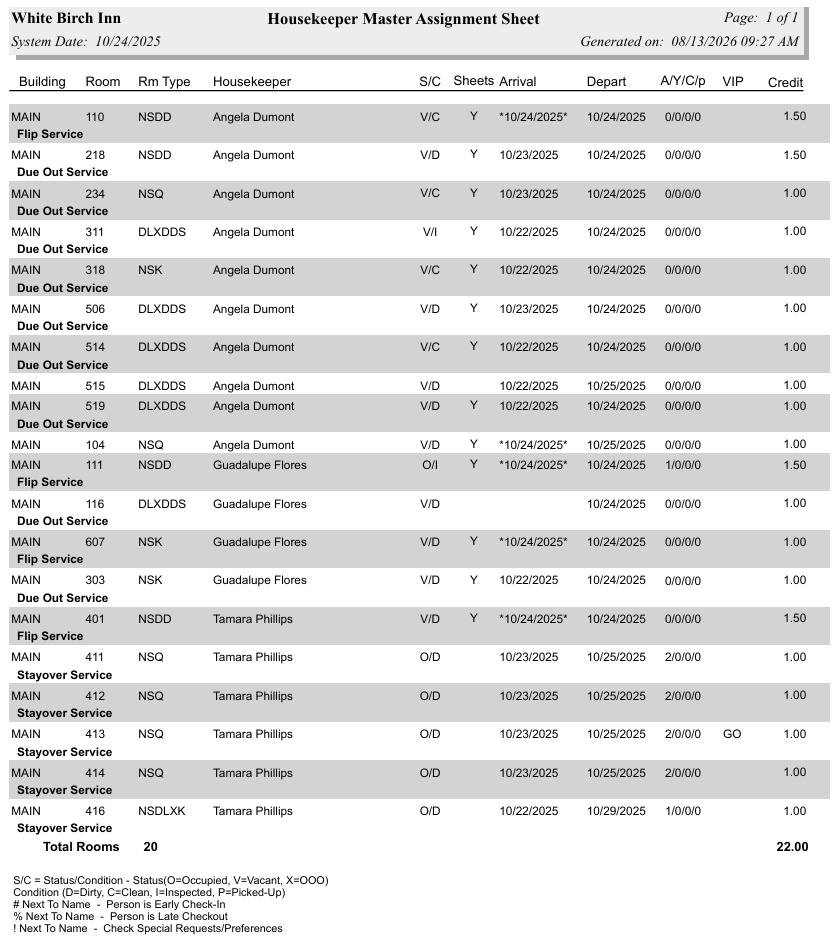
Note: The Master List does NOT show any guest names. The Guest Name column is replaced with the Housekeeper Name column (whom has been assigned to the room), and the arriving guest name (if any) is NOT shown below the service required.
Once rooms have been assigned they will also appear on the Housekeepers Dashboard (an interactive display for your housekeeper's use).
 Assign Rooms to Housekeeping:
To access Housekeeping Room Assignments:
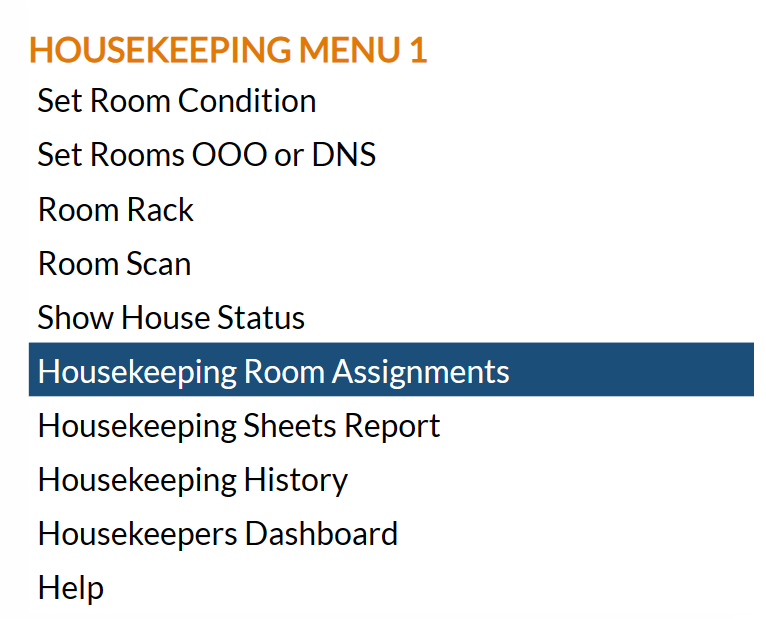
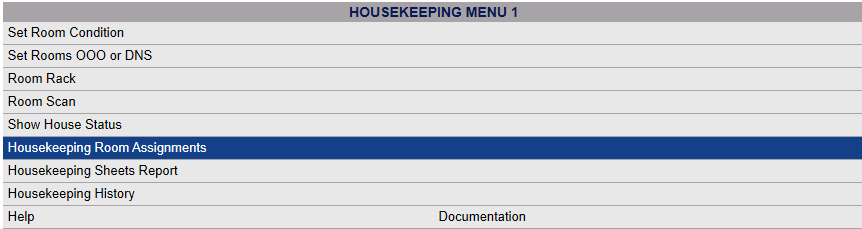
Select Housekeeping Room Assignments from the Housekeeping Menu.
Depending on your Skyware Systems set-up, you may or may not have a quick menu option for Housekeeping.
If you can, Select Housekeeping => from the Quick Menu on the left side of the screen, to open the Housekeeping Menu screen.
Or you can reach the Housekeeping Menu using the Full Menu.
Click the icon on the left or the breadcrumb link at the right for the Full menu.
 OR
OR 
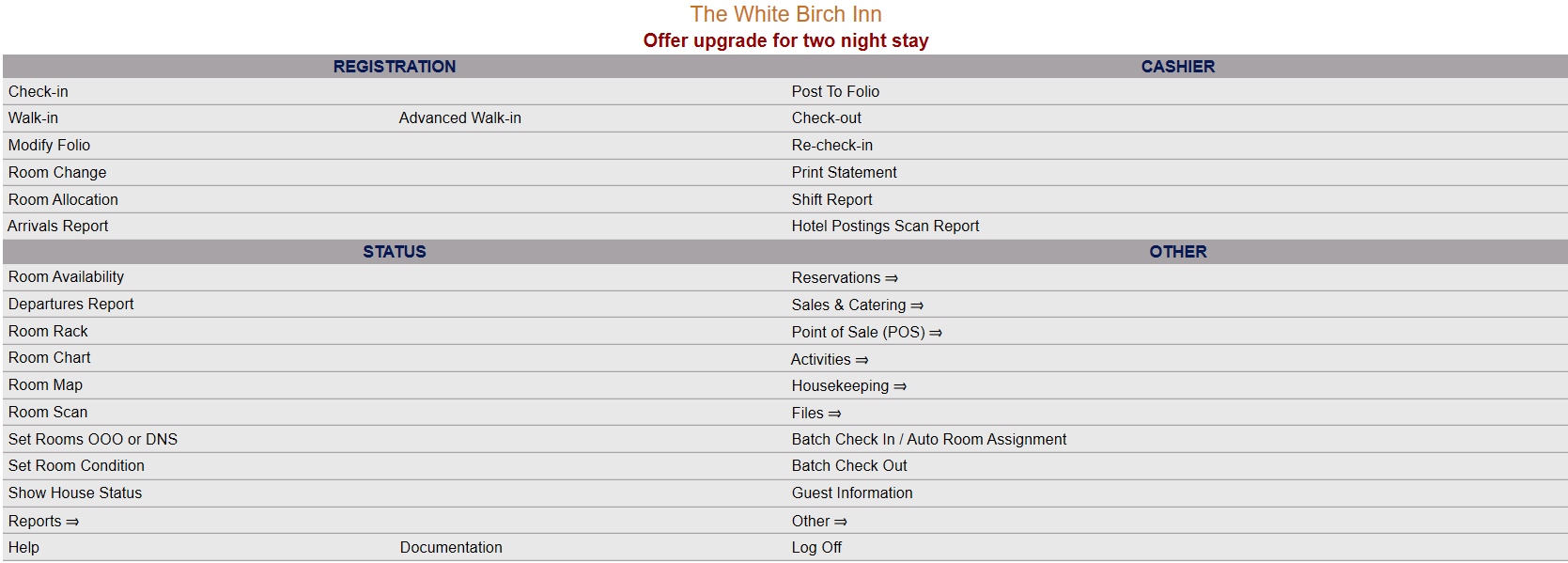
This will display the Full menu in a tabular form, with four sections, Registration, Status, Cashier and Other.
 OR
OR 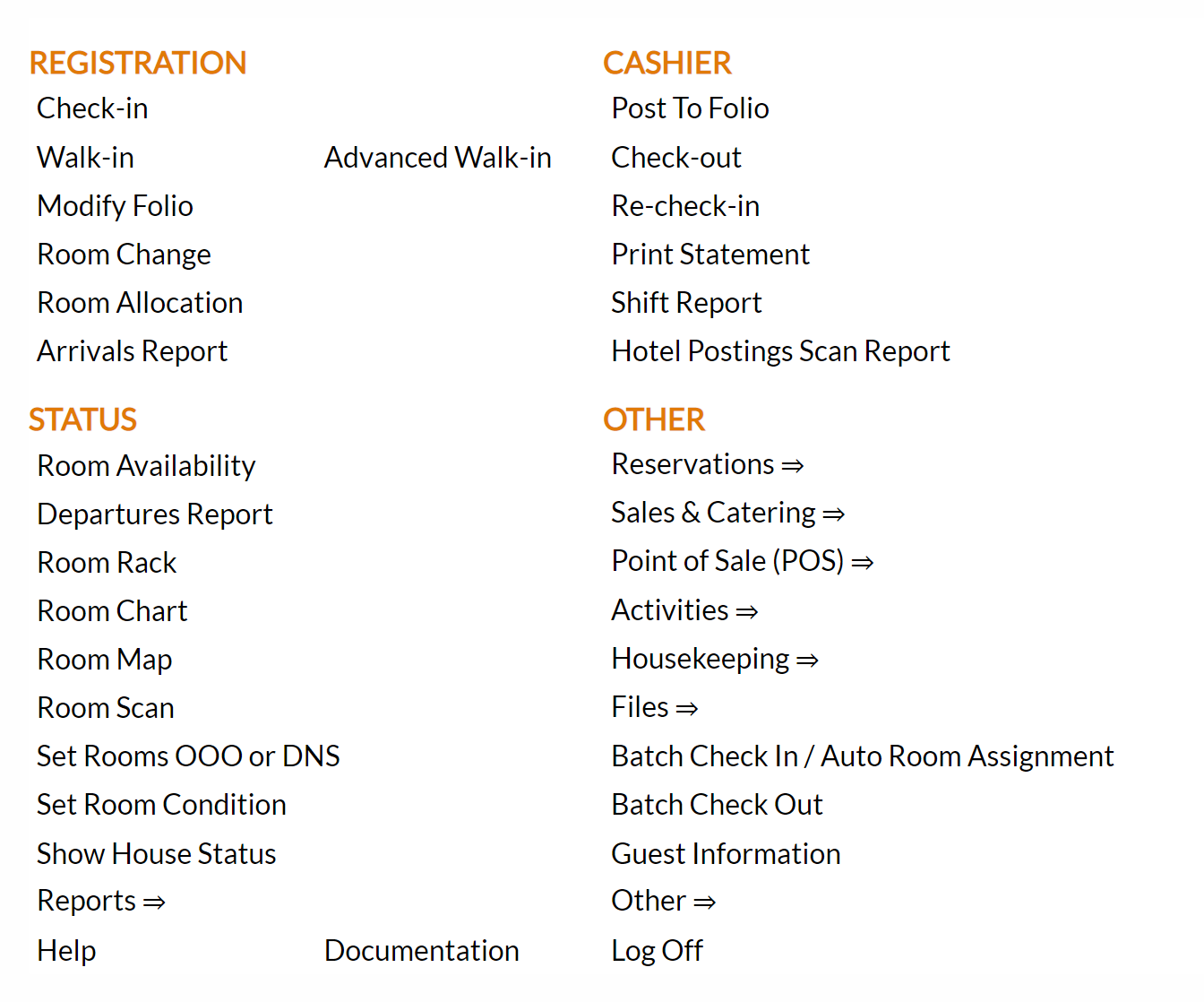
From the Other Section, select Housekeeping =>.
 OR
OR 
The Housekeeping Menu screen will open when accessed.
 OR
OR 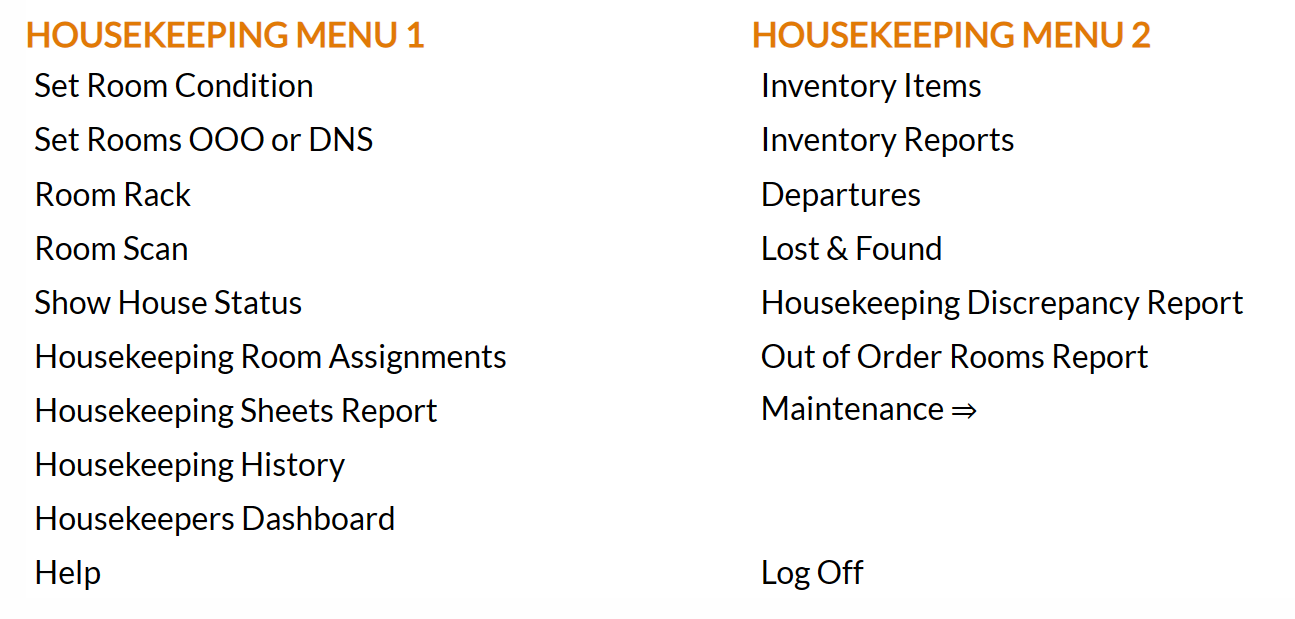
The Housekeeping Menu has two sections, Housekeeping Menu 1 and Housekeeping Menu 2. Housekeeping Room Assignments is in Housekeeping Menu 1.
 OR
OR
When accessed the Housekeeping Room Assignments screen will open.
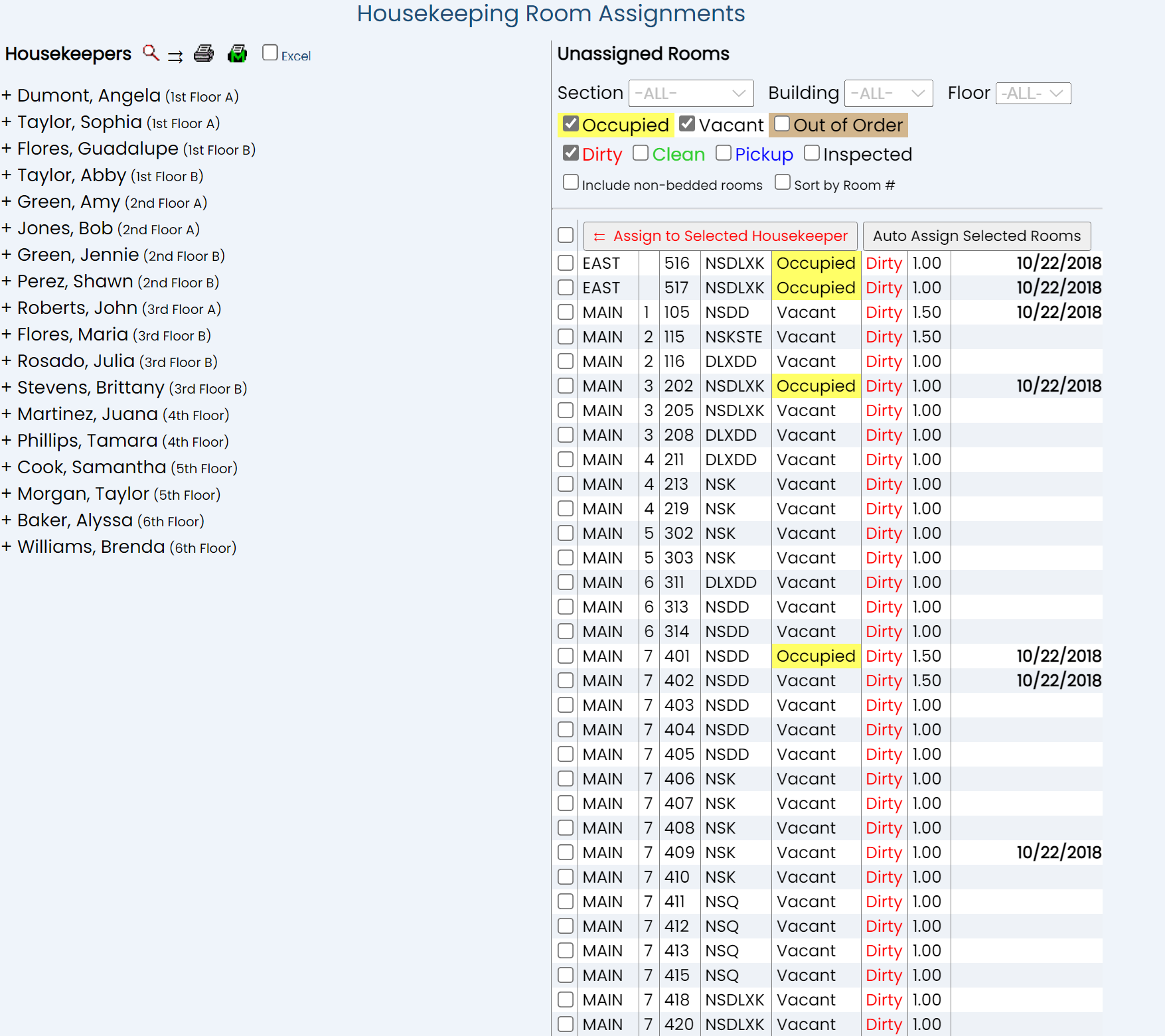
The display is split into two frames, with the left side of the screen showing the list of (active) housekeepers at your property, with all of the rooms assigned to a selected housekeeper accessible in the display via expanding the housekeeper's name (by clicking), and the right showing all the rooms that have yet to be assigned to any particular housekeeper, with various filter options available. Default options will automatically be selected for you when entering the screen (occupied, vacant and dirty) to show the rooms of this type in a list form for selection, but these may be changed as you wish.
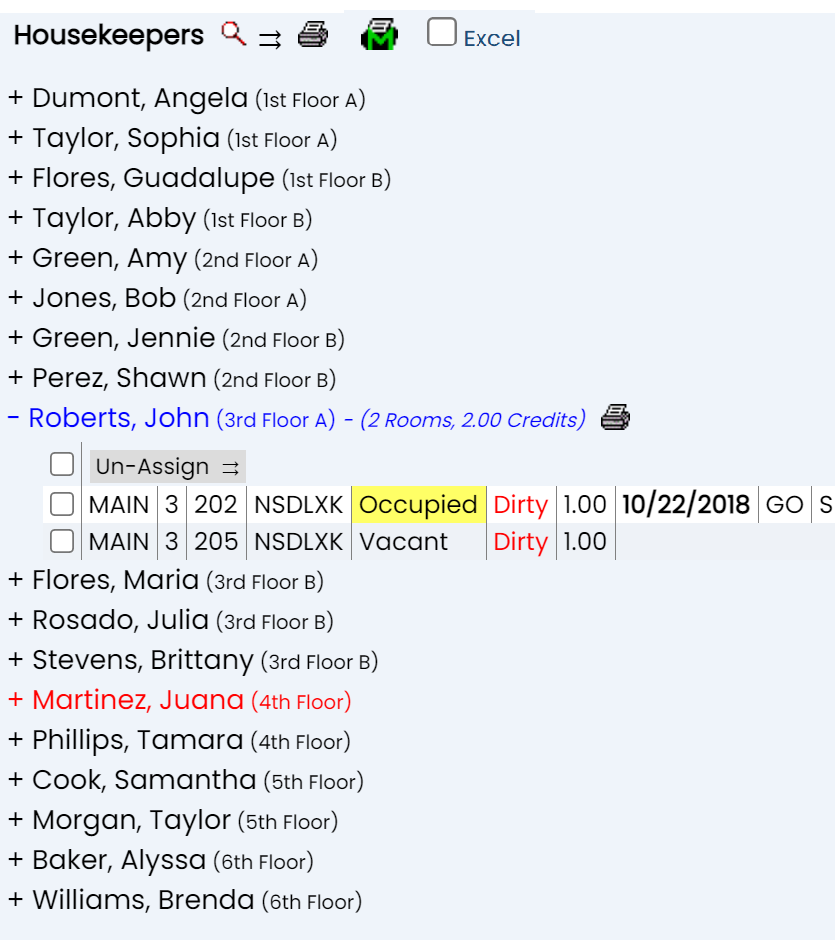
Housekeeper names (and their assigned sections) will be shown in black, meaning no rooms have yet been assigned to them, blue if rooms have been assigned, and red to indicate that the housekeeper entry in question has been expanded for display purposes. When you first enter the Housekeeping Room Assignments screen, it is most likely that no rooms will have been assigned, meaning all the names will be shown in black.

Once rooms have been assigned, the housekeeper's name will become blue, and brief details (the number of rooms and the credits those rooms are worth) will appear next to the name.
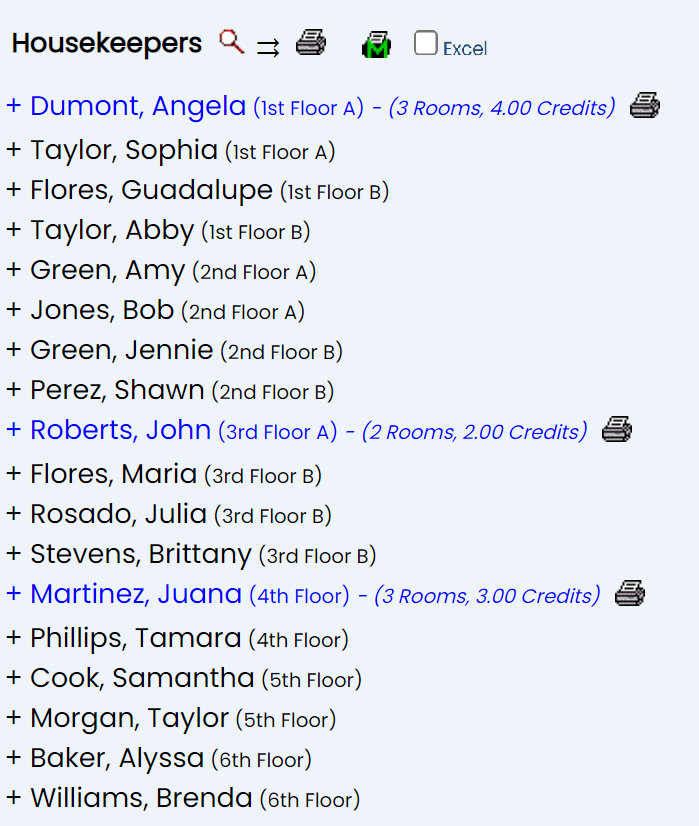
Details of the assigned rooms may be viewed by expanding the housekeepers name. Any line that may be expanded is shown by the presence of a plus sign (+) to the left of it on the screen. Click anywhere on the line to expand the entry and view the room details. The expanded housekeeper's name will be shown in red, to make it clear which entry is currently selected, and the plus sign next to the name will become a minus sign (-) indicating that the expansion may be collapsed back into one line if wished.
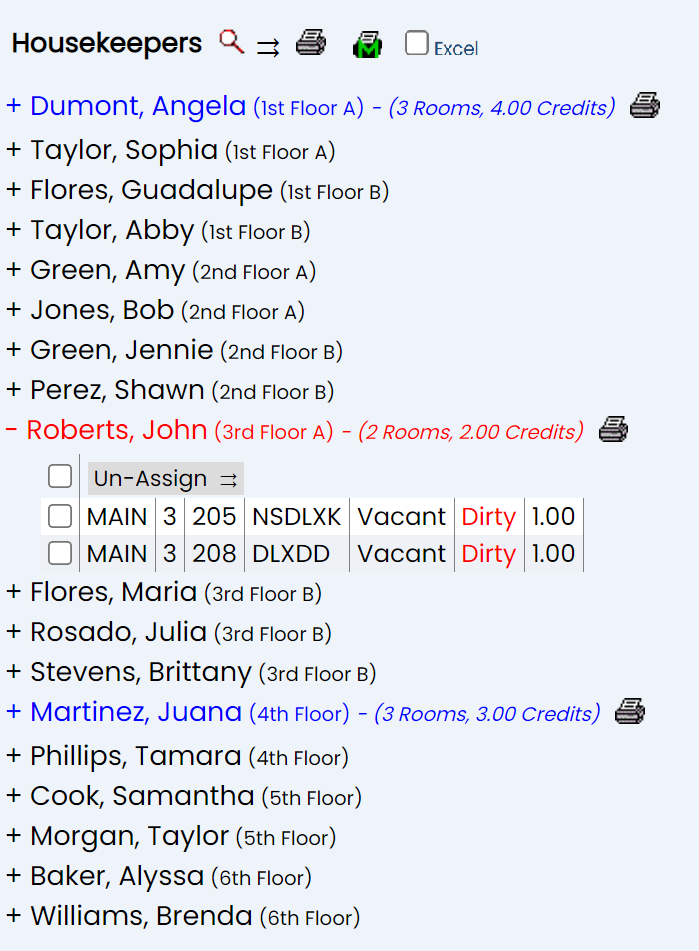
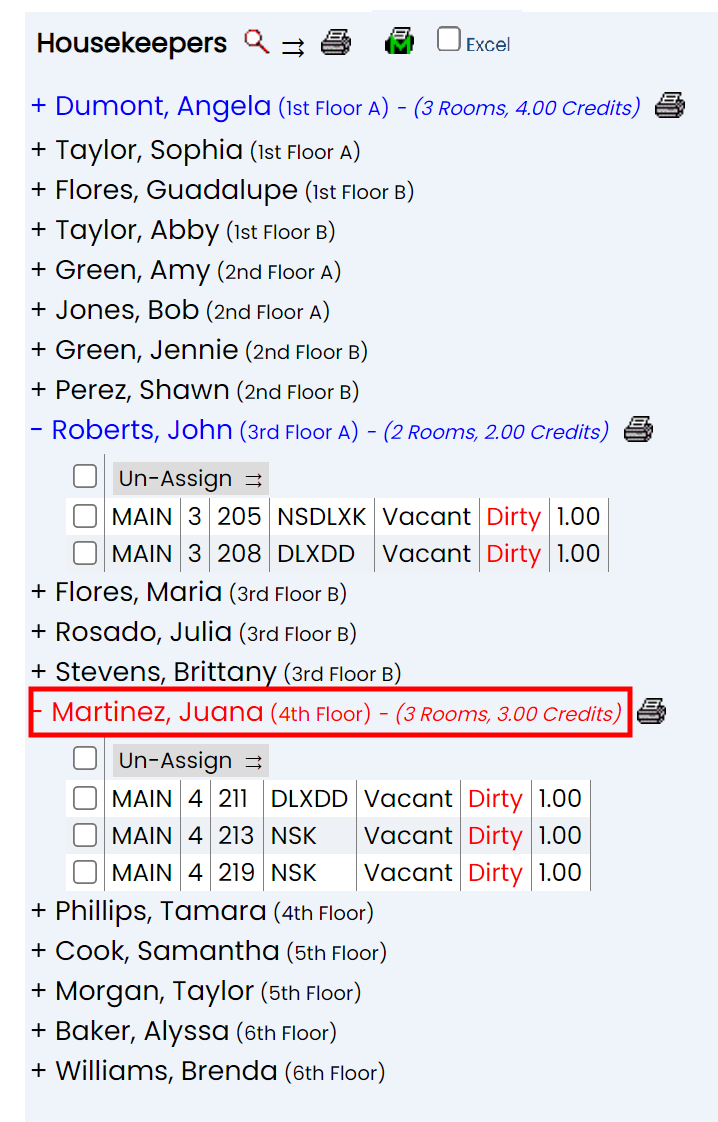
Multiple entries may be expanded at one time. Clicking on a different entry to expand it will NOT automatically close the first one. However only one housekeeper at any time can be SELECTED, and therefore only one housekeeper at a time will be shown in red.
When first entering the Housekeeping Room Assignments screen, ALL housekeepers entered into Skyware will be displayed on the left. Your FIRST action on reaching the screen should be to select the housekeepers you wish to assign rooms to today.
To select the Housekeepers for Room Assignments:
The left hand side of the Housekeeping Room Assignments screen displays the list of housekeepers available. On first entering the screen, ALL housekeepers entered into Skyware will be displayed, by (first) section and (second) alphabetically. To generate the list of housekeepers available for room assignments today, click on the magnifying glass at the top of the screen.
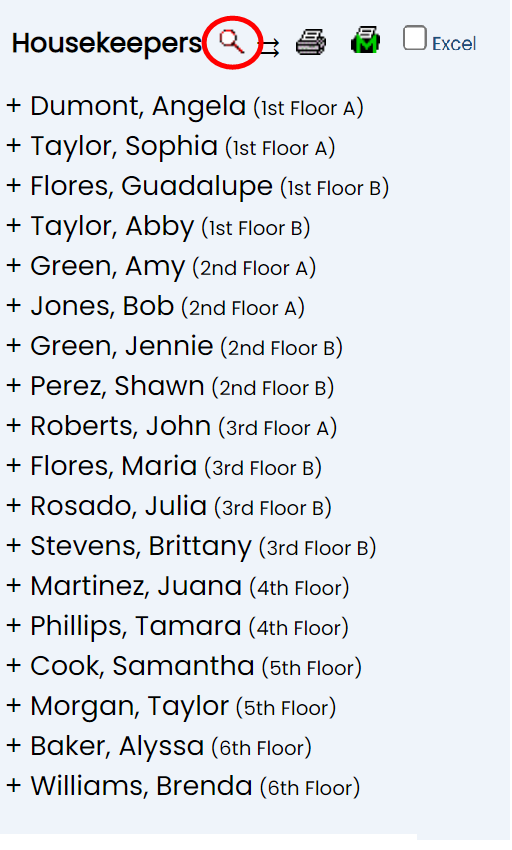
This will open a pop-up window in Skyware that lists all available housekeepers.
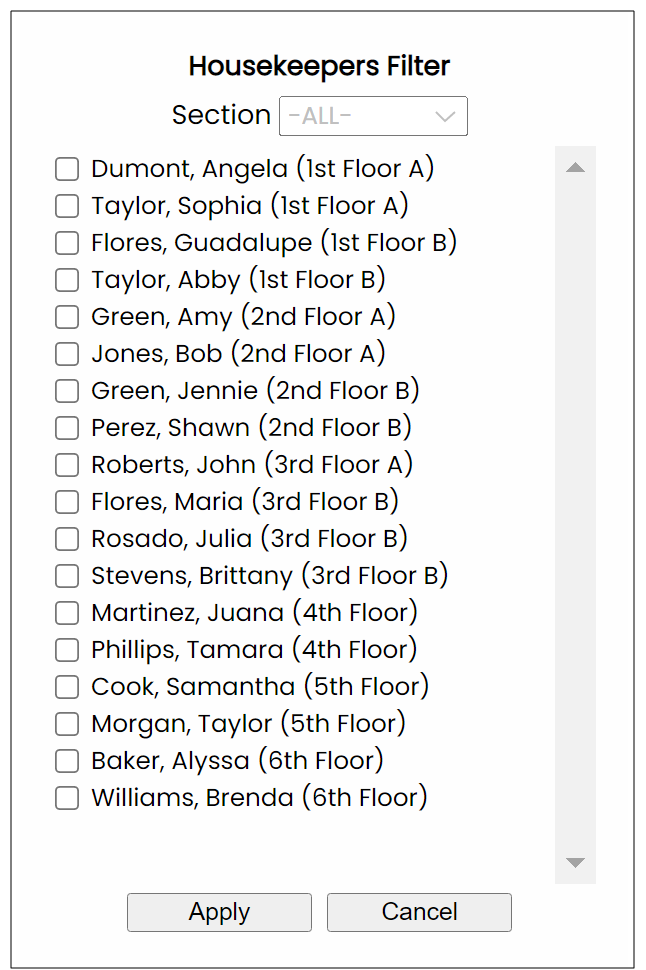
This window allows you to select the housekeepers you wish to assign rooms to from the list of all housekeepers available. As this list may be extensive, it may be filtered by section using the Section drop-down option located at the top of the window. By default, all sections are shown. (Please see Housekeepers for more information on assigning housekeepers to housekeepers sections, if desired).
Select any housekeeper by using the check box to the left of the housekeeper name, then clicking the gray Apply button at the bottom of the window.
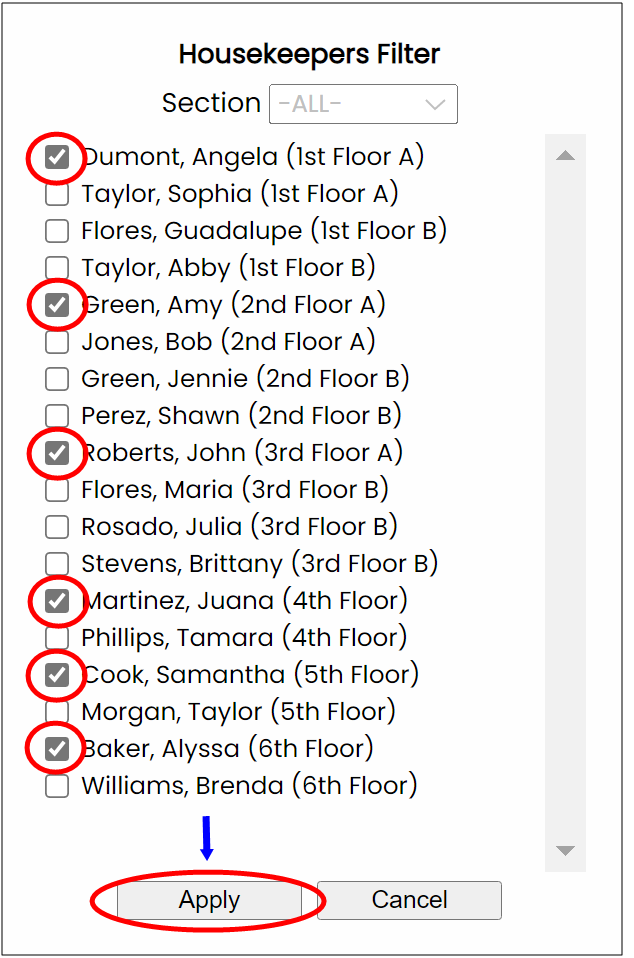
The pop-up window will close and the housekeepers selected will now be the only ones shown on the left side of the Housekeeping Room Assignments screen.
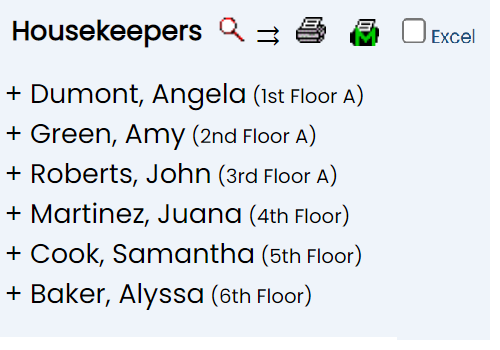
Note: Only housekeepers shown on the Housekeeping Room Assignments screen will be able to have room assigned to them. However the list of available housekeepers for room assignment may be altered at any point during the room assignment process, if necessary.
The Housekeeping Room Assignments screen shows all the rooms that have yet to be assigned to any particular housekeeper on the right hand side, in list form, with various filter options available.
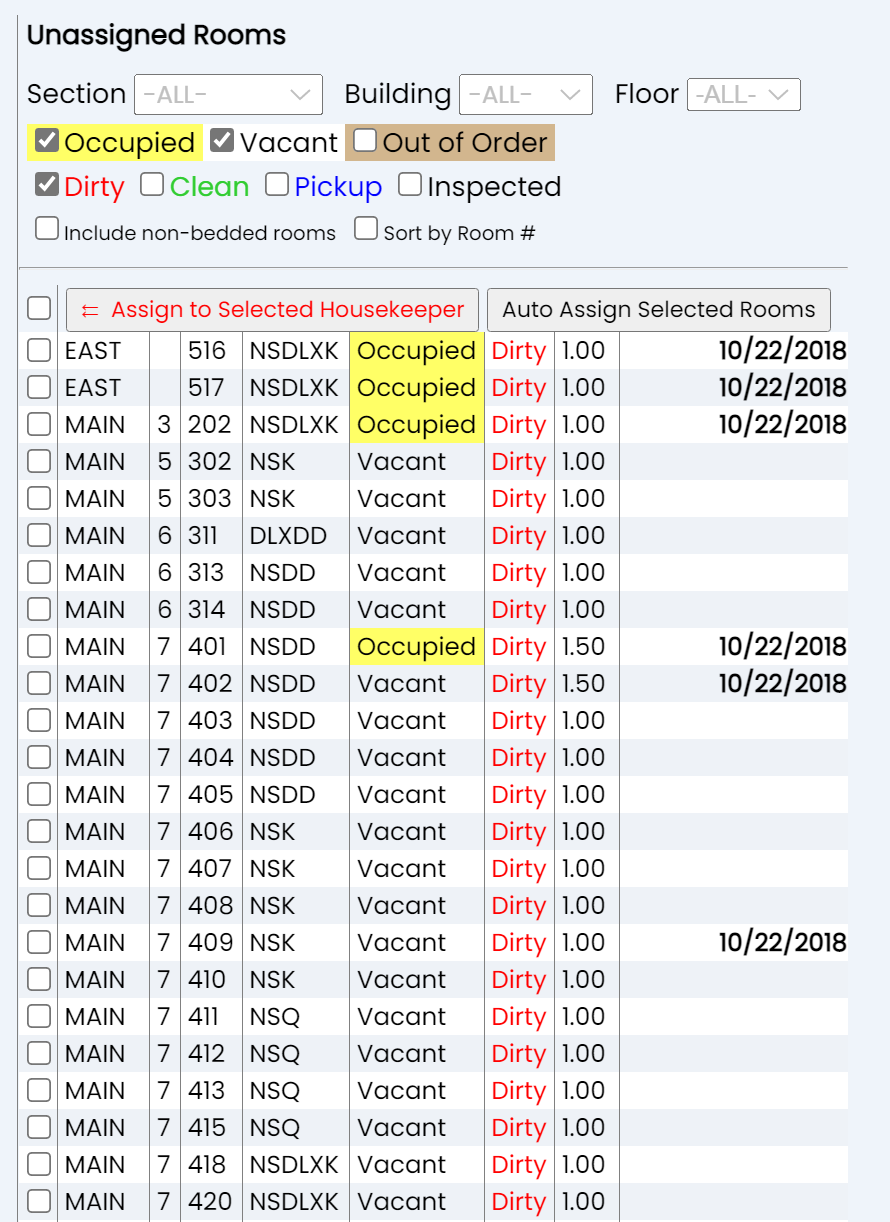
Default options will automatically be selected for you when entering the screen (occupied, vacant and dirty) to show only the rooms fulfilling these criteria, in a list form for your room assignment purposes, but these may be changed as you wish.
Filtering your Un-assigned Rooms for Room Assignment purposes:
There are several categories you can use to filter your rooms and reduce the size of the list of rooms requiring housekeeping to make assignment more simple.
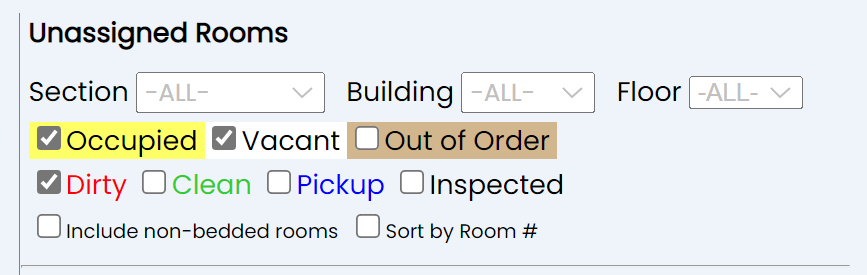
Section: This refers to the Housekeeper Section. The default setting is -ALL-. You can instead, If your Property utilizes Housekeeper Sections, select a section for this housekeeper to be associated with from the drop-down menu here. This will then filter the display to show only the rooms in that section so you can assign them to the relevant housekeeper.
Note: The Housekeepers command is used to create or maintain a list of your housekeeping staff. Your rooms are assigned to a section for cleaning purposes on the Room Definitions screen, where your specific room details are entered (room by room). This selection is part of the Property and System Configuration area of Skyware.
Building: The default setting is -ALL-. Again, you can instead, if your Property has more than one Building configured into Skyware Systems, select one from the drop-down menu here. This will then display all the rooms in that building only so you can assign them to the relevant housekeeper.
Floor: You can select a specific floor to display the unassigned rooms requiring Housekeeping.
Status: Use the check boxes next to the room status to filter the rooms by. Three possible options are available, Occupied, Vacant and Out of Order.
By default, both Occupied and Vacant will be checked, but Out of Order will be unchecked.
Condition: Use the check boxes next to the room condition to filter the rooms by. Four possible options are available, Dirty, Pick Up, Clean and Inspected.
By default, only Dirty will be checked, Clean, Pick Up and Inspected will be unchecked.
Include non-bedded rooms: You can use the check box to include non-bedded rooms when filtering the rooms if desired. By default this is not checked.
Sort by Room Number: Displayed rooms are sorted by rack order. They may instead be sorted by room number if desired. By default this is not checked.
Selecting (or changing) any filter you wish to be applied to the list will AUTOMATICALLY generate the applicable rooms in the displayed list of unassigned rooms.
The list of rooms displayed contains details of the rooms, including the building and floor the room is in, room number and room type, the room status, condition, the number of credits assigned to the room for cleaning purposes, if there is an expected departure or imminent arrival, and if the room requires new sheets (this column is viewable by scrolling the unassigned room list to the right). Every room in the unassigned rooms list will have a selection check box to the left. This will be by default unchecked.
You will assign rooms from the pool of unassigned rooms on the right side of the Housekeeping Room Assignments screen to the housekeepers on the left. This may be done in two ways - firstly, by individually assigning selected rooms to selected housekeepers, by selecting first the housekeeper on the left, then the rooms on the right, and using the Assign to Selected Housekeeper button in the unassigned rooms section; or secondly by automatically assigning rooms, by selecting all the rooms that will need housekeeping on the right, then using the Auto Assign Selected Rooms button to have the rooms assigned to housekeepers one after the other up to the maximum number of credits per housekeeper, with the housekeepers in the list on the left being assigned rooms in descending order.
Assigning a room to a housekeeper will remove the selected room from the list of unassigned rooms.
1. Assigning Selected Rooms to Selected Housekeeper(s):
Assign selected rooms to selected housekeepers, by selecting first the housekeeper on the left, then the rooms on the right, and using the Assign to Selected Housekeeper button in the unassigned rooms section, which will add the selected rooms to the selected housekeeper.
On the left side of the Housekeeping Room Assignments screen, select a housekeeper by clicking on the name. The selected housekeeper will be shown in red.
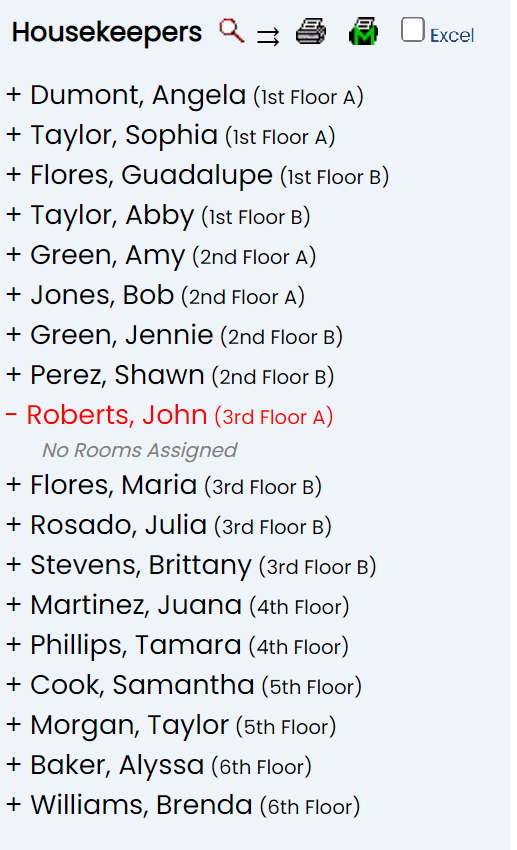
Note: Clicking on a housekeeper entry will first select the housekeeper AND expand the entry. Expansion displays the details of any rooms assigned to the selected housekeeper. If no rooms have been assigned, a message saying this will be displayed. You can close the expansion display if desired whilst still keeping the housekeeper selected by clicking the name once more. The expanded entry will close but the name will remain shown in red (which indicates the housekeeper currently selected).
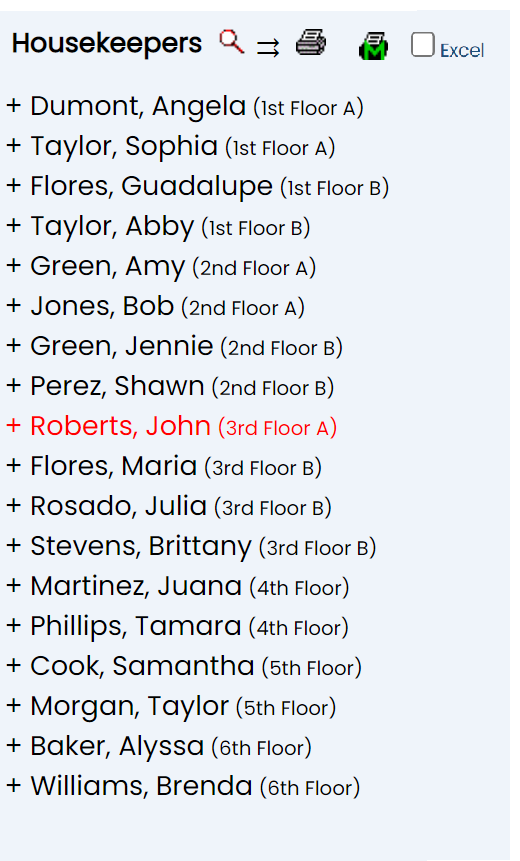
Only ONE housekeeper can be selected at a time in this way. Clicking on another name will select that housekeeper INSTEAD, not as well as the current selection.
On the right side of the screen, select the room(s) to assign to the selected Housekeeper. Multiple rooms may be assigned to the selected housekeeper at one time, check each one which is to be assigned.
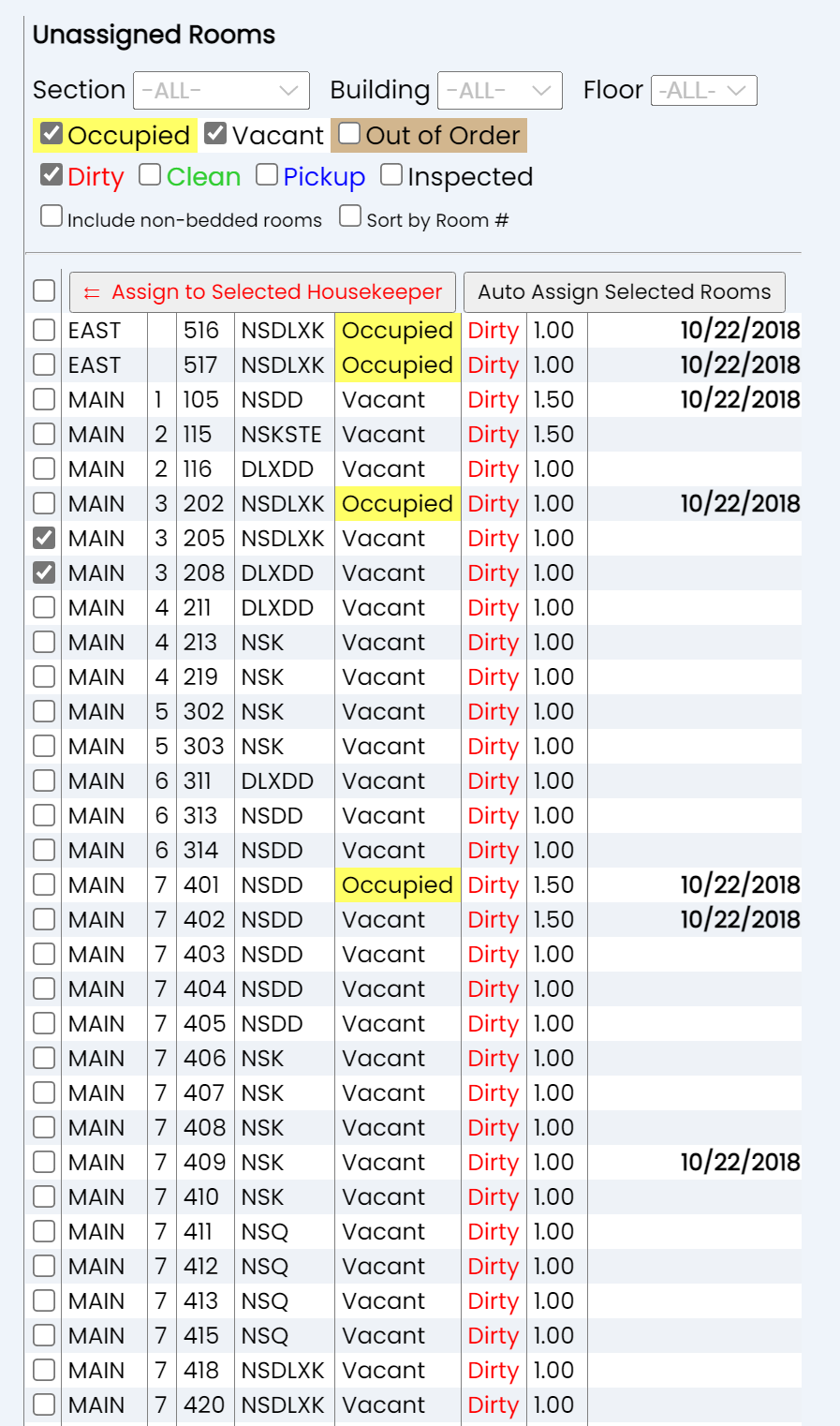
Once all rooms to be assigned to the selected housekeeper have been selected, use the Assign to Selected Housekeeper button in the unassigned rooms section to assign the rooms.
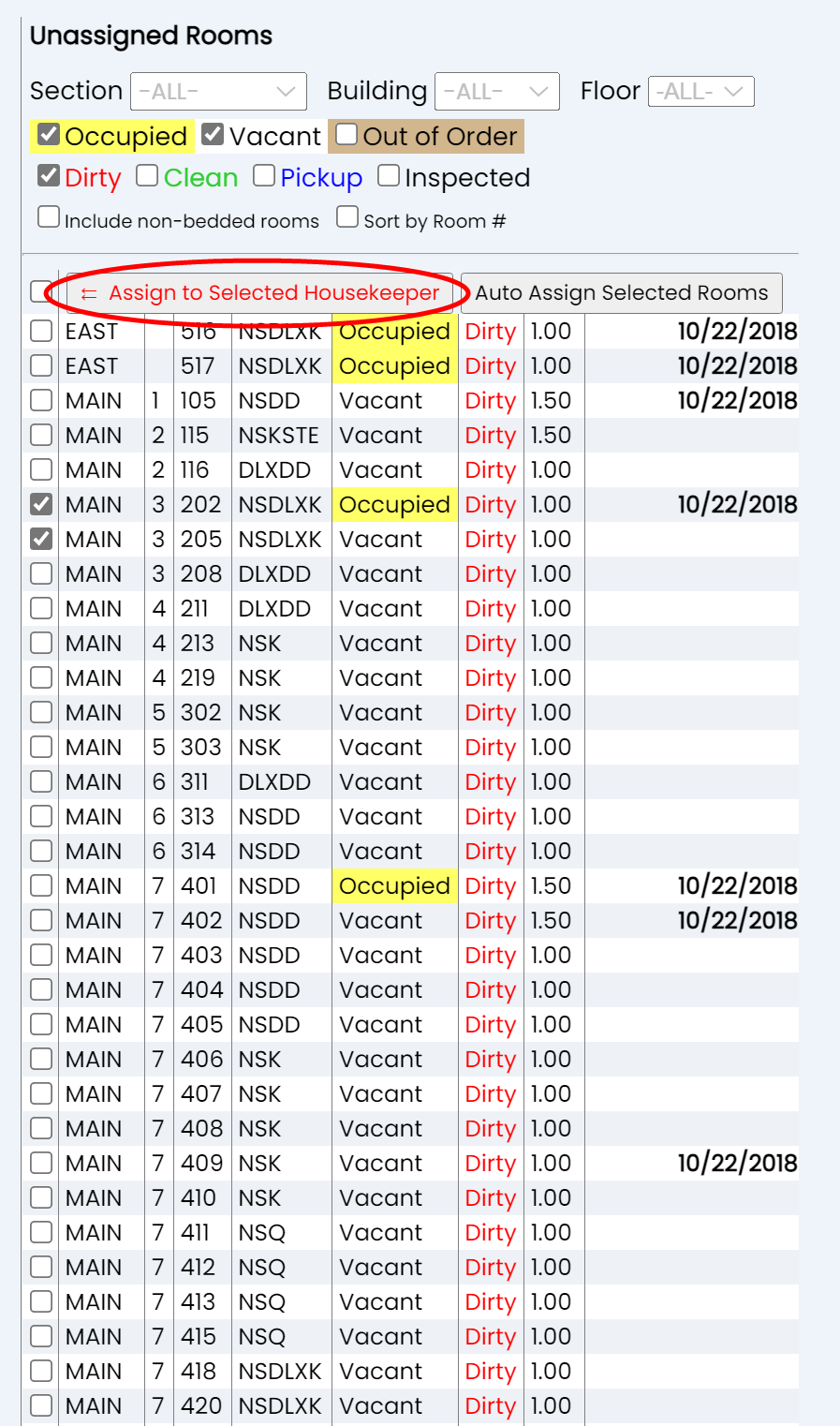
This will simultaneously remove the selected rooms from the unassigned rooms list, and assign them to the selected housekeeper. Brief details (the number of rooms and the credits those rooms are worth) will appear next to the housekeeper's name, and the room details will be automatically expanded and displayed under the selected housekeeper.
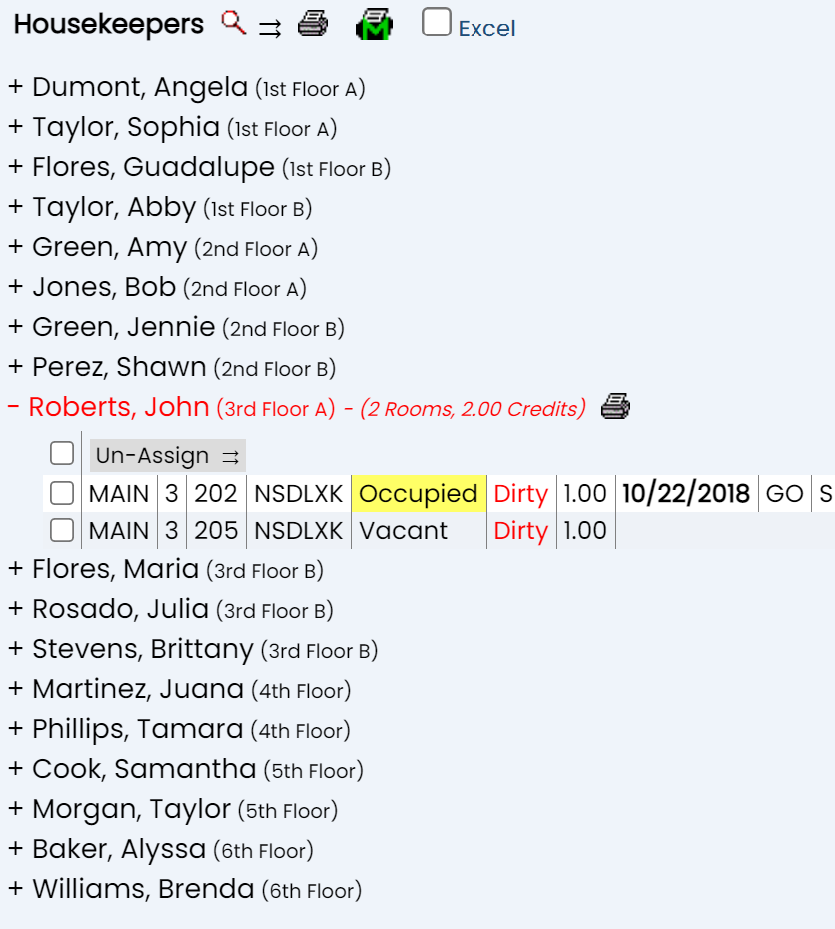
You may choose to close the expansion, or simply move on to the next housekeeper to assign rooms to by clicking on the new name. Either way, once a new housekeeper has been selected, the housekeeper with assigned rooms will be shown in blue, and the new selection in red.
Repeat the housekeeper selection process and room assignment process as many times as necessary until all the rooms requiring housekeeping services have been assigned. This will mean that the unassigned rooms section on the right hand side of the screen lists no rooms.
Note: The maximum number of credits to be assigned to a housekeeper during AUTOMATIC assigning of rooms is set using the Housekeeper screen. However MANUALLY assigning rooms will override the number of maximum credits set for this auto assigning process, meaning the selected housekeeper can be assigned to as many rooms as wished. Please be aware and do not manually select too many rooms to assign to one housekeeper.
2. Automatic Assigning of Rooms to Housekeeper(s):
Unassigned rooms may be AUTOMATICALLY assigned to the housekeepers listed on the left side of the Housekeeping Room Assignments screen quite simply, by selecting ALL the rooms that will need housekeeping on the right, then using the Auto Assign Selected Rooms button to have the rooms assigned to the housekeepers (based on assigned sections first) one after the other up to the maximum number of credits per housekeeper, with the housekeepers in the list on the left being assigned rooms in descending order.
Ensure that the list of housekeepers shown on the left is the list of housekeepers to which rooms should be assigned. Whereas when selecting individual housekeepers to match with specific rooms the process requires active selection on your part, automatic allocation means that any housekeeper shown on the screen may receive room assignments, and the specific rooms to which housekeepers are assigned is done automatically, by the maximum number of credits and the order in which the housekeepers appear in the list. This means you may need to filter your housekeepers and/or rooms by section if you wish to ensure that certain housekeepers are not assigned to certain rooms (or floors of your property).
Note: The maximum number of credits to be assigned to a housekeeper during automatic assigning of rooms is set using the Multi-Property / Other tab of the Housekeepers screen. The default entry in this field is 0, which means NO room credits may be assigned to the housekeeper automatically. To use the auto assign feature, housekeepers must have a number of credits entered greater than 0.
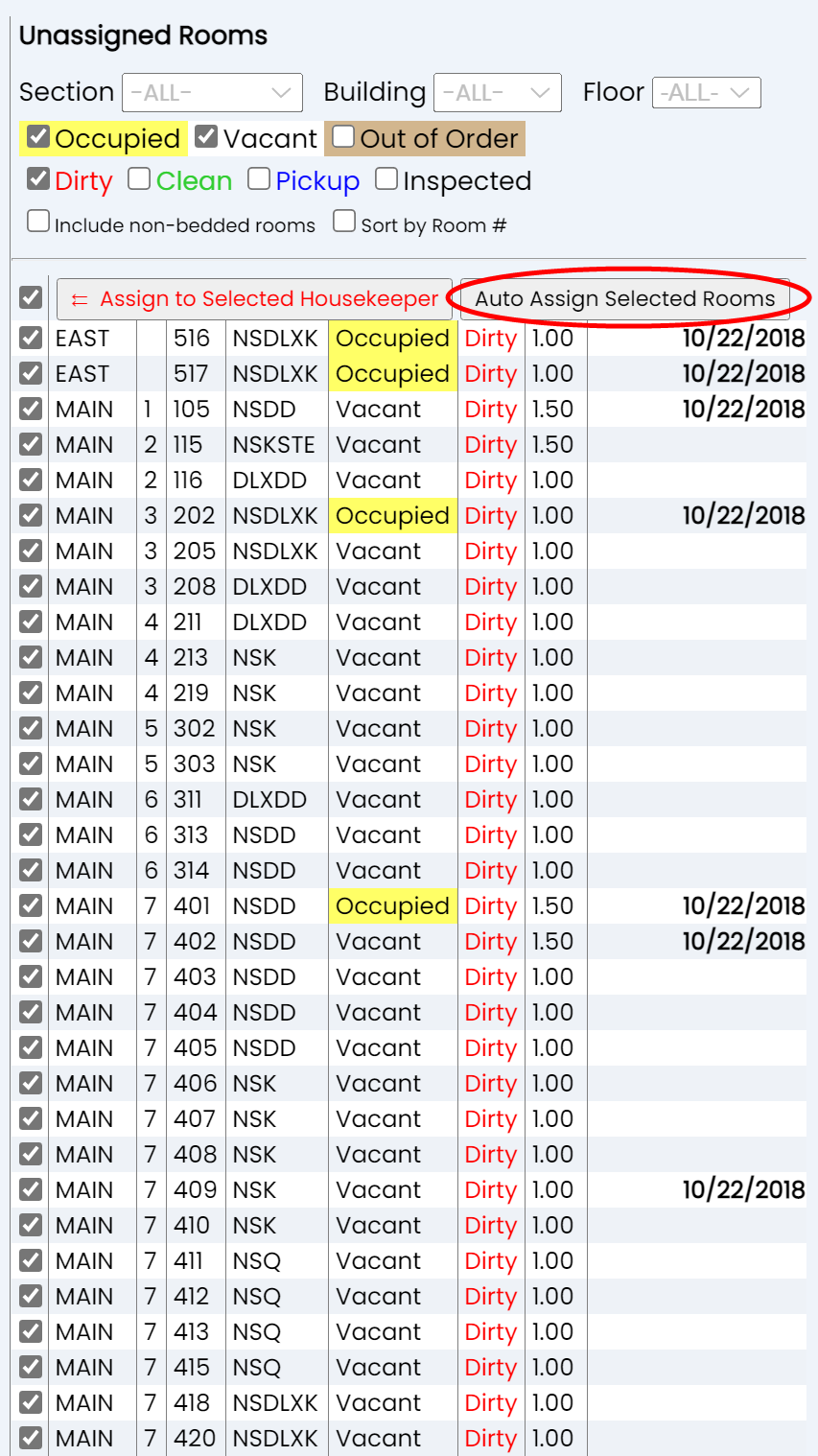
Select all the rooms to be auto assigned on the unassigned rooms list. This can be done by individually checking the rooms, or by using the "Check All" check box at the top of the list to automatically select every room shown in the list.
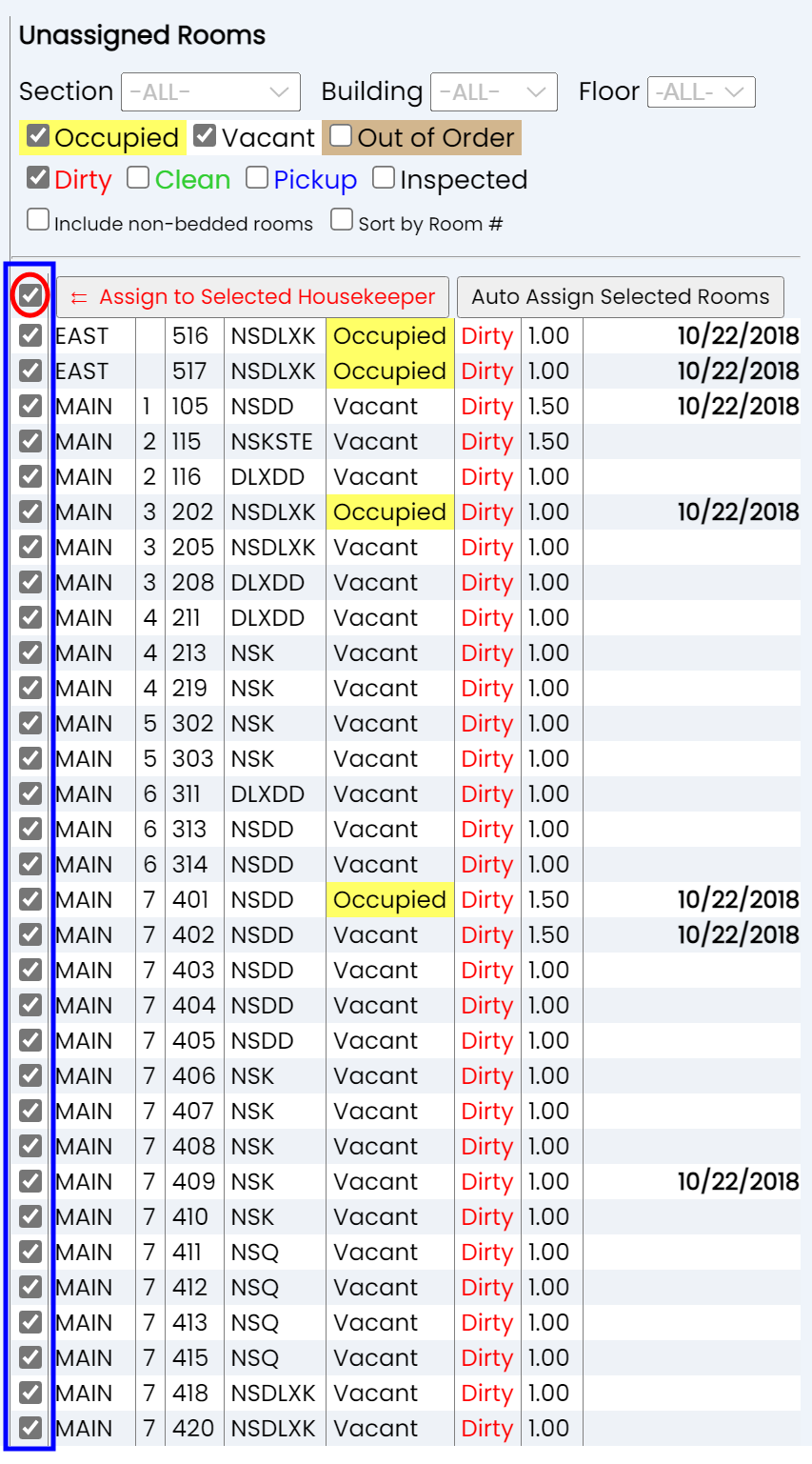
When the rooms have been selected, click the Auto Assign Selected Rooms button.
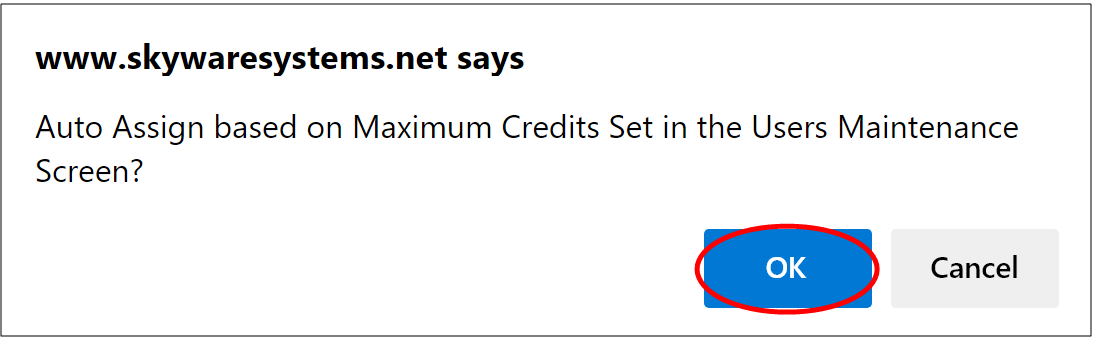
A pop-up window will appear, asking if Skyware should "Auto Assign based on Maximum Credits Set in the Users Maintenance Screen?" To auto-assign, the blue "OK" button must be clicked.
This will simultaneously remove the selected rooms from the unassigned rooms list, and assign them (always by section first if sections are assigned, and then by rack order or room number order, whichever display is shown) to the housekeepers shown on the left, in descending order by number of credits - once the first housekeeper in a section has been assigned enough rooms to complete their maximum number of credits allowed, the process will move on to the next housekeeper, and so on, until all rooms have been assigned or the maximum number of credits has been reached for all housekeepers. This is done initially by section ONLY - section 1 rooms will match with section 1 housekeepers, section 2 rooms will match with section 2 housekeepers etc. If there are fewer rooms needing housekeeping in a section than housekeepers have credits for, some housekeepers may not be assigned any rooms. If there are more rooms in a section that need housekeeping than there are housekeeper credits, those rooms will be held for a second pass then assigned to housekeepers with remaining credits in the next section in descending order. THE FIRST PASS IS FOR SECTION ONLY. A SECOND PASS IS FOR ALL UNASSIGNED ROOMS UP TO THE MAX CREDITS FOR THE HOUSEKEEPERS. This helps ensure that housekeepers are not assigned rooms outside their sections UNLESS there are more rooms that need housekeeping services than can be covered by the housekeepers for that section (for example, if someone is ill in section 2 there may be not enough housekeepers for all the rooms in that section, but the rooms still need to be cleaned, so a housekeeper in another section could end up assigned a room in section 2 as well as the rooms in their own section if they have enough credits).
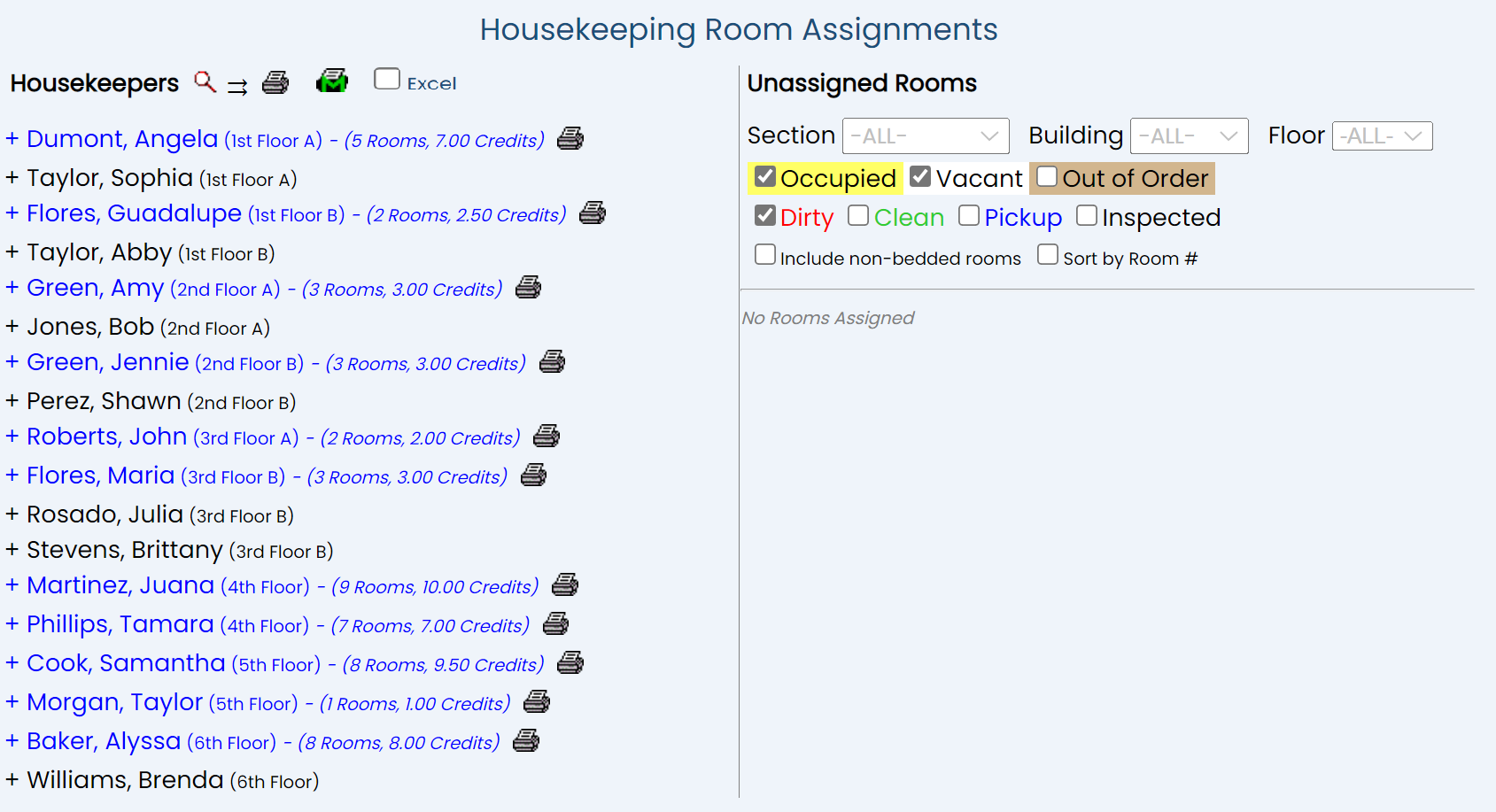
In this example it can be seen that all rooms were assigned, and that certain housekeepers did not receive any room assignments. This is because the number of rooms needing housekeeping in those sections is fewer than housekeepers have credits for.
Un-Assigning Rooms:
Whether manually or by auto assignment, once a room has been assigned to a housekeeper, it will be removed from the list of unassigned rooms and instead the details will appear with the housekeepers expanded display on the left side of the screen.
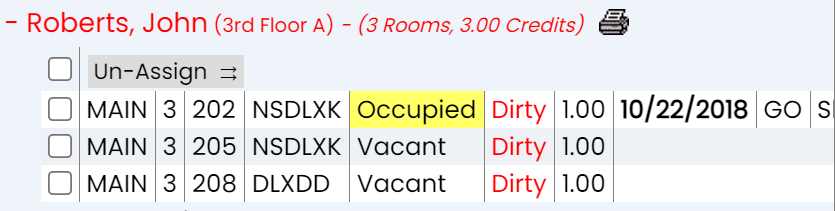
If a room has been assigned to a particular housekeeper and you wish to change this for any reason, you can un-assign it and return it to the pool of unassigned rooms shown on the right. Select the room(s) you wish to un-assign from a housekeeper by using the check box alongside the entry, then clicking the "Un-Assign" button at the top of the expanded display. (Again, you can use the "Check All" check box at the top of the list of rooms to affect the entire list of rooms at one time if desired).
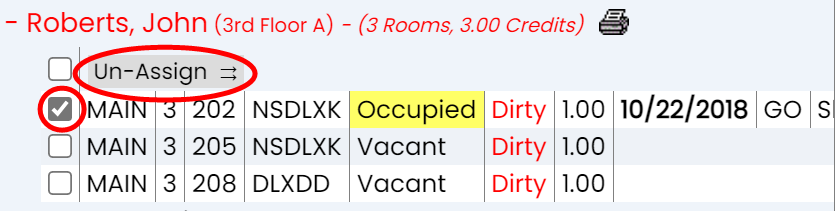
This will automatically remove it from the display on the left and add it back into the pool of rooms displayed on the right that require housekeeping assignment.

Once you are happy with the list of assigned rooms for your Housekeeper, you can print the assignments. Assigned rooms will also automatically appear on the interactive Housekeepers Dashboard screen, once the housekeeper has logged in.
Printing Room Assignments:
Any housekeeper with rooms assigned to them will have a Print icon appear next to their name.
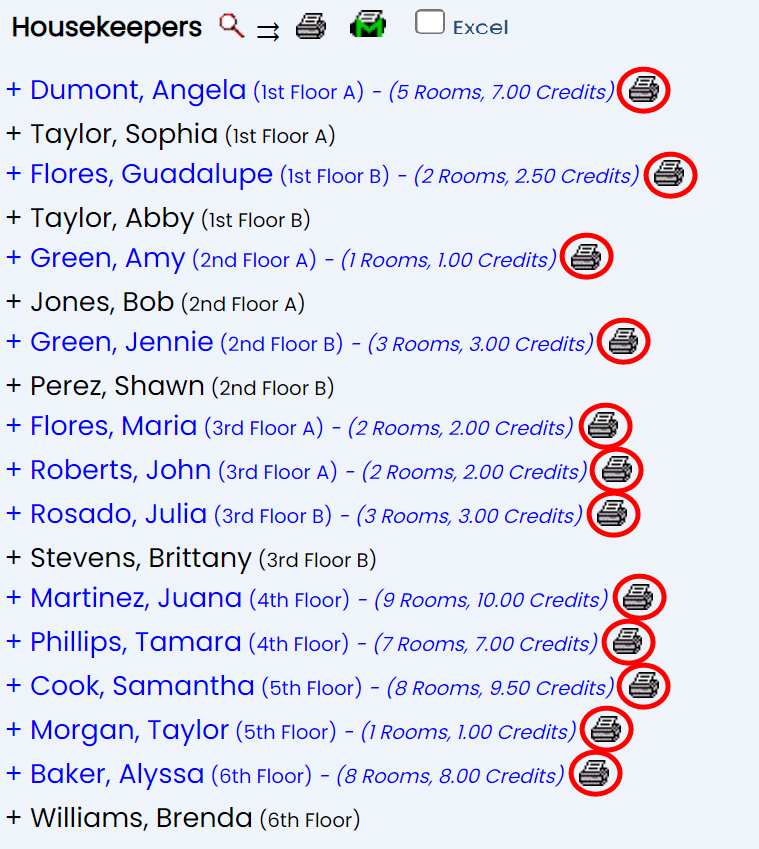
Click the Print icon next to a name to open a PDF of the room assignments for the individual Housekeeper. This PDF opens as a new tab and can be printed for use.
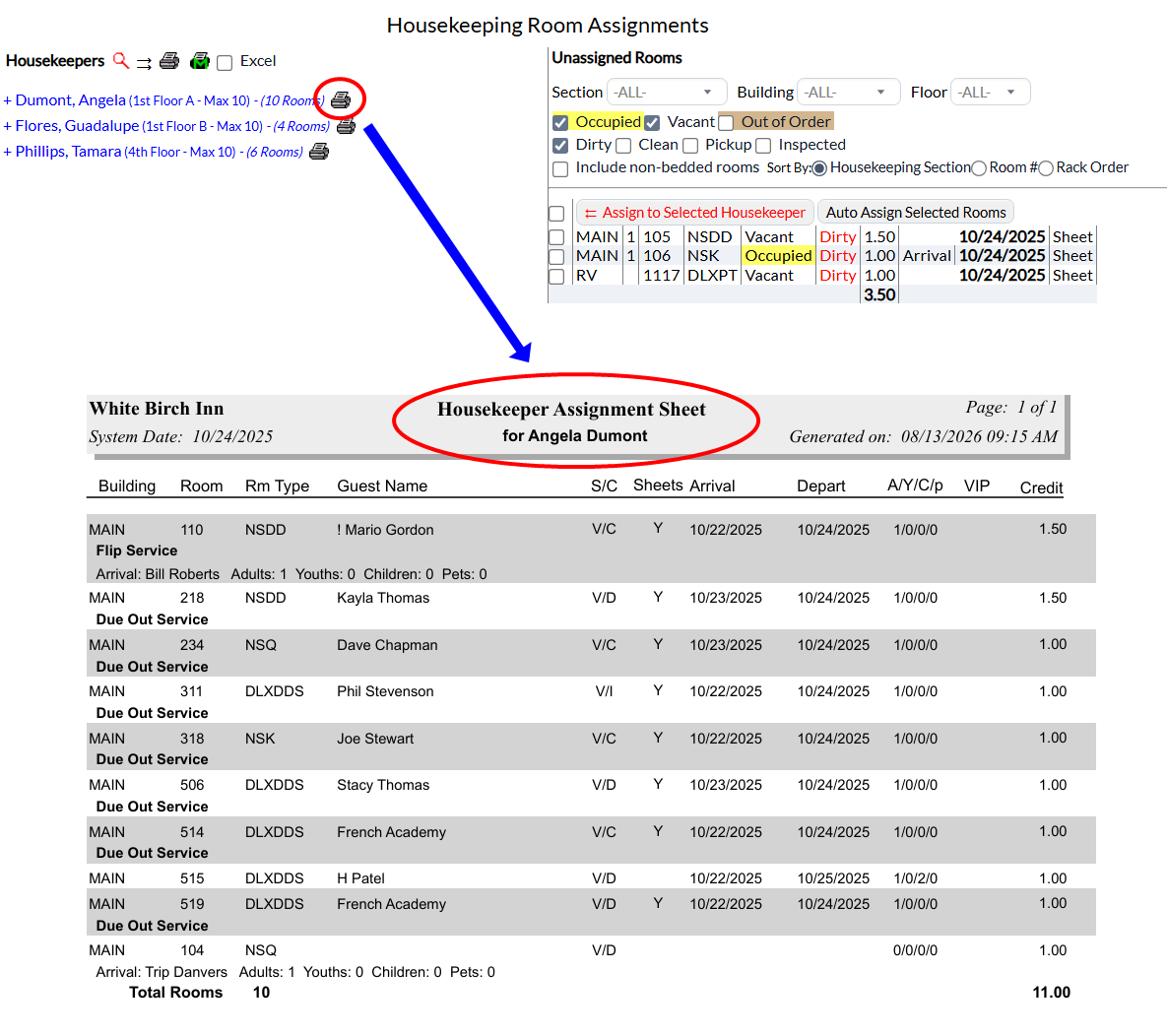
The report will show the building the room is in, with what kind of service is required for the room (flip service, stayover, check out etc) and any arriving guest name (and numbers of adults, youths, children, and pets) below it, then the room number and the room type, the current guest (occupying the room) name, the status (O=Occupied, V=Vacant, X=OOO) and condition (D=Dirty, C=Clean, I=Inspected, P=Picked-Up) of the room, if the sheets need changing (Y or N), the arrival and departure dates of the guest(s), the number of adults, youths, children, and pets in the room, if the guest has any VIP status associated with them and the number of housekeeping credits awarded for the room. The total number of rooms and housekeeping credits is also shown on the report.
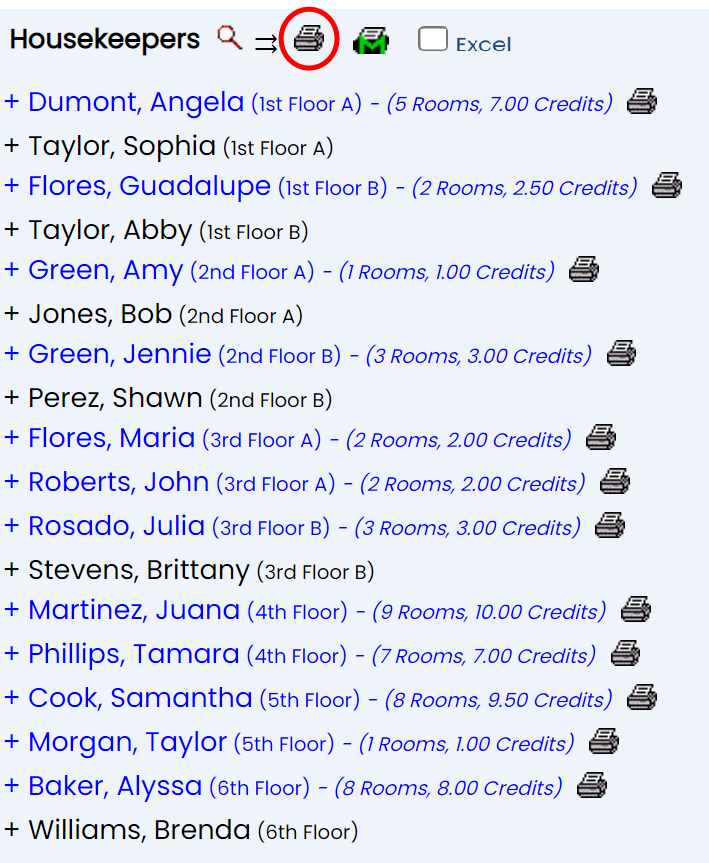
Click the Print All icon at the top of the Housekeepers list to open a PDF of the room assignments for ALL Housekeepers with assigned rooms; each Housekeeper's assignments will be on a separate page. This is useful to bulk print all of the assignments at once.
Note: There are several symbols used to indicate special circumstances for a room assigned to a housekeeper. A hatch sign, a percentage sign or an exclamation point preceding the guest name on the printed Housekeeping assignment sheet indicate respectively that this guest has an early check in, a late check out or a special request or preference recorded in the system. The details may be viewed on the Arrivals Report.
Click the Print Master icon (printer icon with a large green "M" superimposed on it) to open a PDF of the Housekeeping Master List report, (the Housekeeper Master Assignment Sheet).
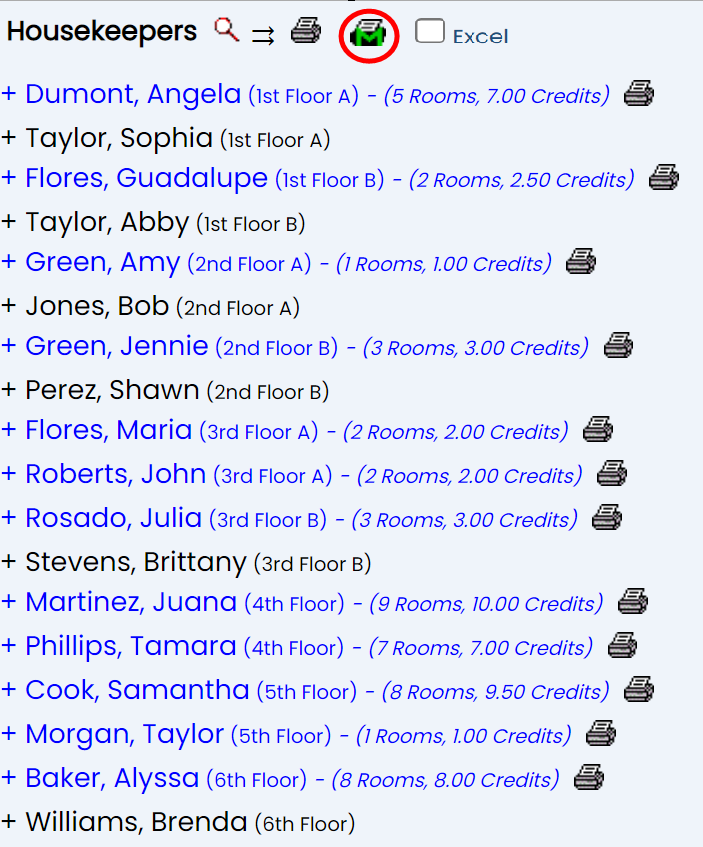
The Housekeeper Master Assignment Sheet is a list of ALL rooms with housekeeper assignments, with whom has been assigned to the room shown.
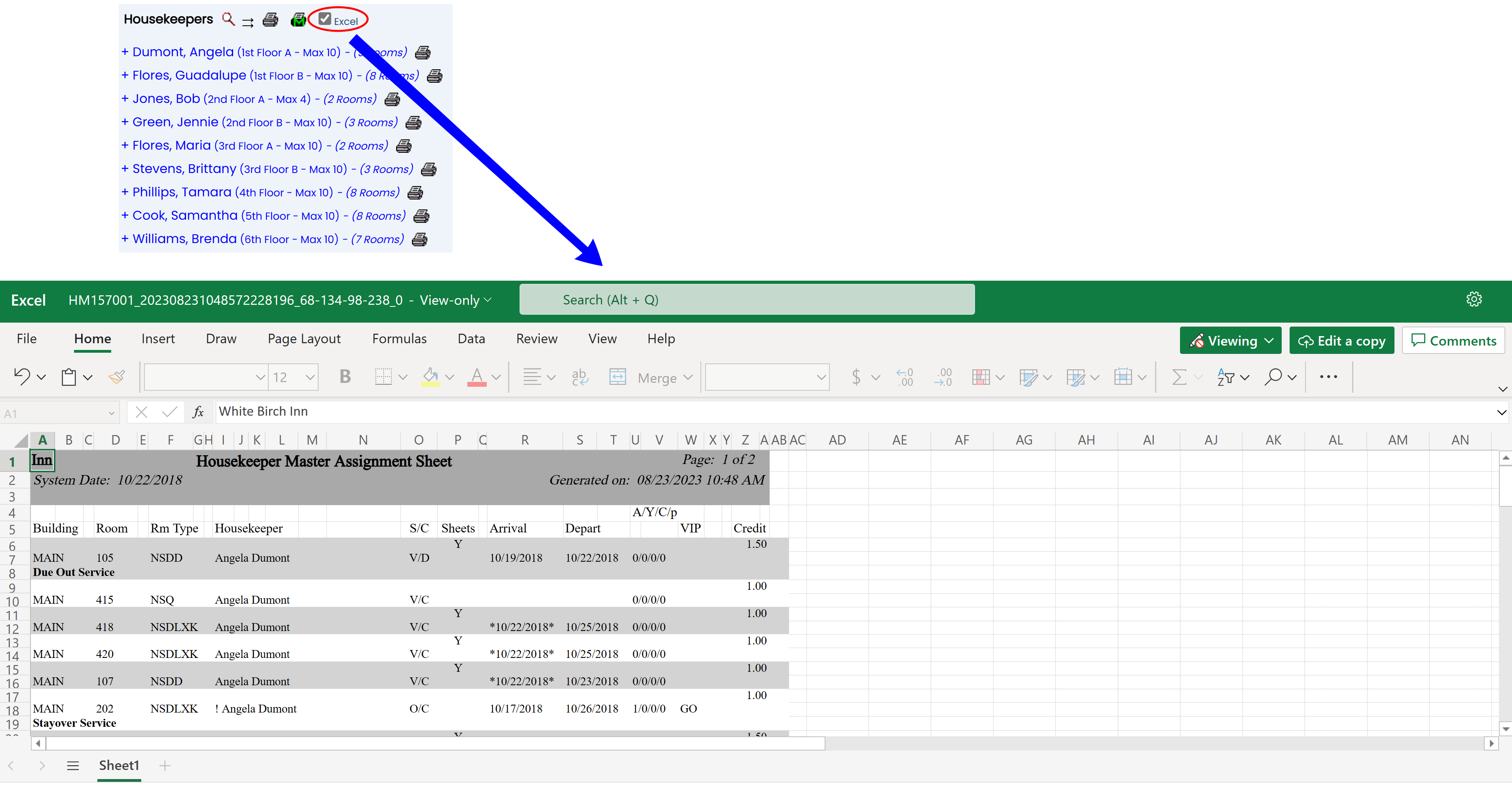
Note: Checking the Excel checkbox BEFORE clicking either the Print icon or the Print Master icon will cause the report to be generated in excel, rather than as a PDF.
Date Updated August 13, 2026